TriageBox

Clear your Gmail inbox in minutes, not hours

Every email in one sentence, whole senders cleared with the exact count first, and scam checks on every message. Free, with no account.

A browser on mail.google.com with the TriageBox popup open under its toolbar icon, which shows 9 unread. The popup lists nine fictional emails, each with its time, category, sender, a signal-bar score and one-click buttons; a sign-in email shows its code 482913 with Copy code, and an invoice about new bank details carries a red phishing mark.
TriageBox on a fictional mailbox. Watch the one-minute demo of 2.02 →

From noise to done, without opening every email

Every email in one sentence

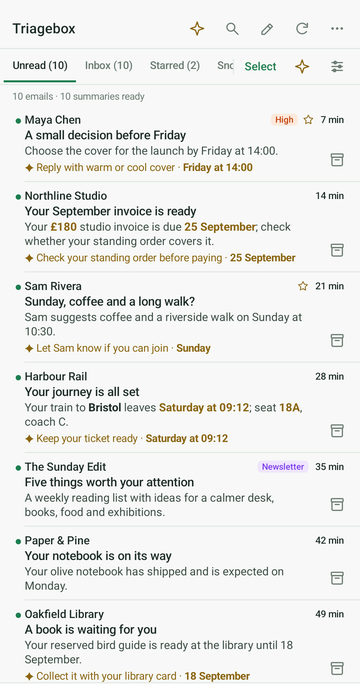
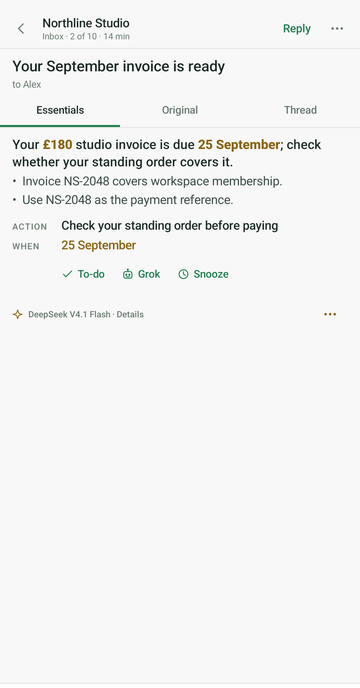
Each email becomes a short summary with the fact that matters in bold, plus the next step and its deadline when there is one.

  • In the email’s own language
  • PDF attachments summarised on the card
  • Sign-in codes copied in one click
Summarise a PDF attached to Gmail
A TriageBox summary on a school email: three bullet points with the facts in bold, an orange next-step callout reading Book a slot before Friday noon, and Reply, Add to calendar, Copy and Regenerate under it.

Plan the whole inbox, apply once

The Triage page scores every email and suggests an action for it. Change any of them, then Apply actions does them all.

  • Keep unread after a peek
  • Mute a sender without writing a filter
Keep Gmail unread after peeking
The Triage page: nine emails, one row each with the sender and time, the subject, address and a one-line summary, a suggested action and a signal-bar score, with Apply actions at the bottom.

Clear whole senders, with the exact count first

Bulk sweep groups your mail by sender, subject, age or Gmail tab. Nothing is archived or deleted until you have seen the live count and confirmed.

  • An overview of where your messages are, from Gmail’s own counts
  • Unsubscribe and delete per sender, using the list’s own unsubscribe header
  • Recently removed restores anything for 24 hours
Bulk unsubscribe in Gmail
Bulk sweep on a fictional mailbox: the messages split by folder (Inbox, Archive, Sent, Drafts, Spam and Trash), charts of their age and Gmail tab, and the senders with their counts and sizes.

Scam checks with no AI key

Every email is checked against Gmail’s own sender verdict and its reply address. A risky one carries one warning mark that opens the reason.

  • A company address whose replies go to a personal mailbox
  • A brand name sent from someone else’s domain
Gmail phishing checker
The popup in its dark theme: an invoice email about updated bank details, opened into Possible phishing: replying goes to gmail.com, a personal mailbox, not to northwind.example. Buttons: Report spam, Not phishing.

Also on Android

A native app that talks to Gmail from your phone, with the same summaries, snooze and undo. It is not on Google Play yet: ask and we send the signed APK.

Opens a pre-filled email from your own mail app; nothing is stored on this site. Android 8.0 or newer · installs outside Google Play.

How it works

1

Add it to your browser

Chrome, Edge, Brave or another Chromium browser. Sign in on Google’s own consent screen; there is no TriageBox account.

2

Open Gmail, click the icon

Pin TriageBox to the toolbar: its badge is your unread count. Open Gmail, then archive, snooze, unsubscribe or reply from the popup.

3

AI, only if you want it

  • Free Gemini API key from Google AI Studio, no card. Google’s free daily limits apply.
  • Or bring your own key: OpenRouter, xAI Grok or a billed Gemini project. You pay that provider, usually a fraction of a cent per summary.

Keys stay in your browser and go straight to the provider. With no key, everything but summaries and scores works.

Your inbox does not pass through a TriageBox server

No mailbox server

Mail is processed in your browser and goes only between it and Google.

Keys stay on your device

AI keys stay in this browser profile, never in sync, and go only to the provider that issued them.

Revoke any time

At myaccount.google.com/permissions. Uninstalling removes local data.

What this app does, in one paragraph. The purpose of TriageBox AI Gmail Checker is to help the signed-in user manage and prioritise their own Gmail inbox from the browser. It is a productivity Chrome extension (toolbar badge, popup and side panel) that, with the user's OAuth consent, accesses the user's Gmail and optionally Google Calendar so they can view unread mail; archive, snooze, label, trash or mark threads read and unread; review possible phishing risk; see their calendar agenda; and optionally generate AI summaries using API keys the user supplies. It has no mailbox backend. This homepage is the official product site for the application of the same name configured on the Google OAuth consent screen. Read the Privacy Policy and the Terms of Service.

Questions

Is it free?

Yes. Free to install, with no subscription and no TriageBox account. Donations are optional and never unlock features.

Do I need an AI key?

No. Cleanup, unsubscribe and the scam checks work without one. For summaries and scores, use a free Gemini API key from Google AI Studio (Google’s free daily limits apply), or bring your own key for OpenRouter, xAI Grok or a billed Gemini project and pay that provider directly.

Does mail go through a TriageBox server?

No. There is no TriageBox mailbox server. Mail goes between your browser and Google, and AI requests go straight to the provider whose key you added.

Which browsers and phones?

Chrome, Edge, Brave and other Chromium browsers that install Chrome Web Store extensions. On Android there is a native app, sent on request. There is no iOS app.

Will it replace Checker Plus for Gmail?

For everyday popup mail actions and desktop alerts, yes. TriageBox adds sender cleanup, unsubscribe, spam review and optional AI; Checker Plus keeps richer voice and notification controls. The full comparison.

Get your inbox back under control

Free, with no account. Nothing changes in Gmail until you confirm it.

Add to my browser
TriageBox

— visitors — views — clicks on Add

Loading counts…